
01IT Service Management · Incidents and major incidents
From the first signal
to the post-incident review.
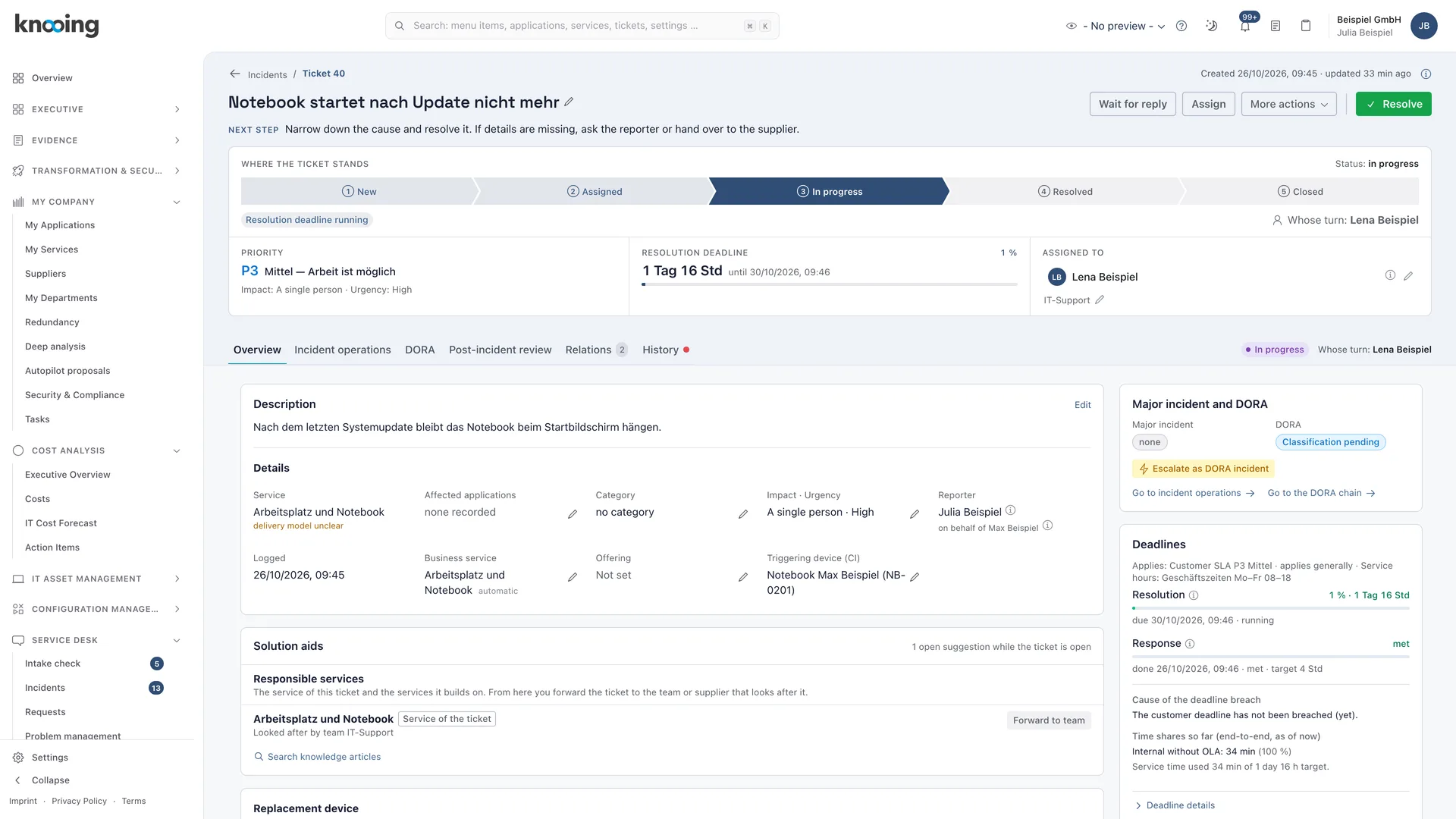
Every incident follows a defined lifecycle enforced by the server. When it gets serious, you declare a major incident, staff roles and run the reporting chain with deadlines, reminders and evidence.
Incidents and major incidents
Handle incidents with confidence, even when it gets serious.
01Lifecycle
A lifecycle enforced by the server.
Every incident moves through defined statuses from New to Closed. The server decides which action is allowed, not the interface. Every step stays traceable.
- Waiting statuses for customer, supplier, change and problem; solving the problem resolves waiting incidents too
- Recovery check before resolving, resolution code mandatory per tenant
- Complete history of every event including SLA clock, escalation and approvals
- Analyse long-running incidents, including automatically closed ones
02Major incident
Crisis team and plan when it matters.
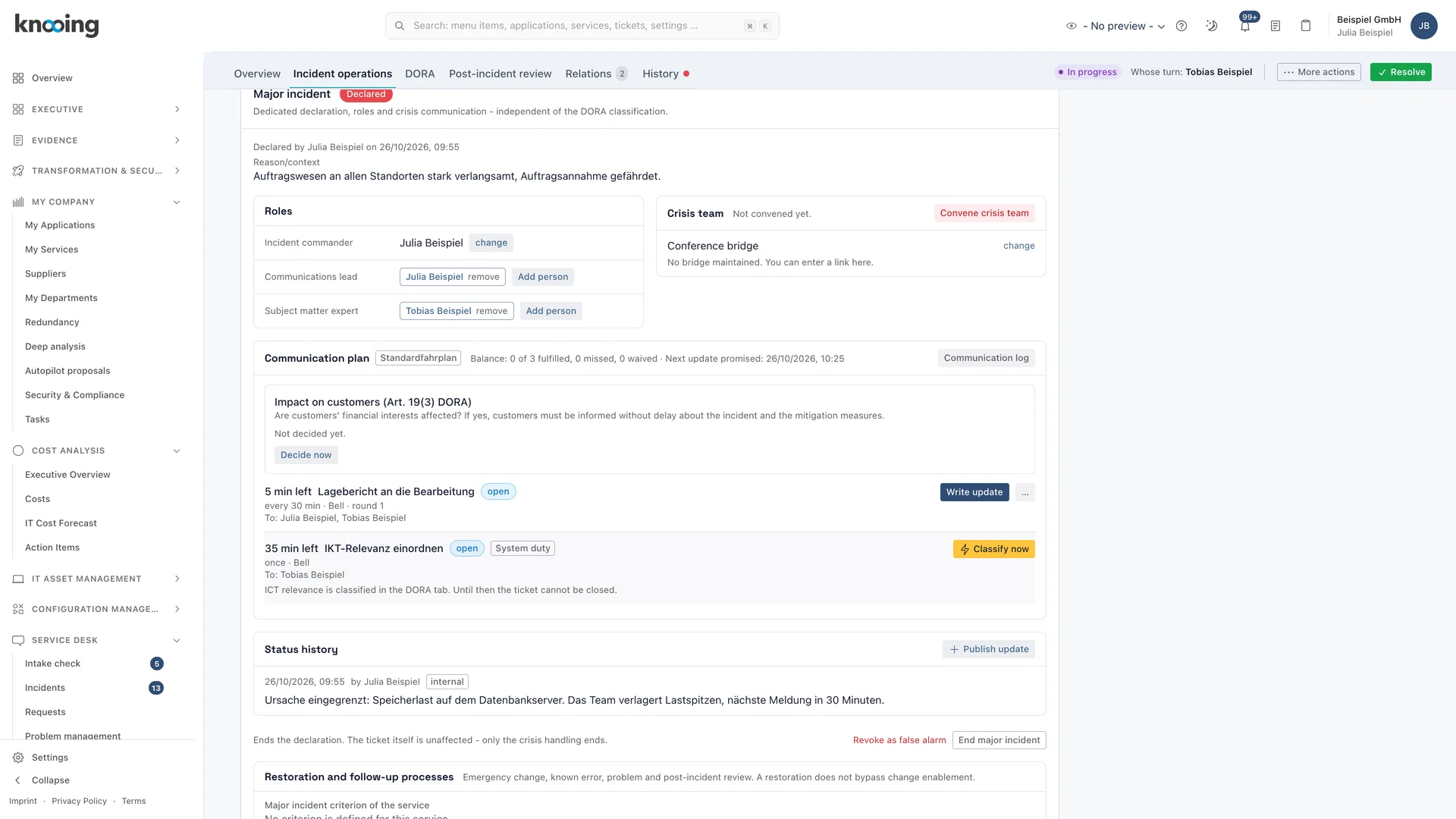
knooing suggests major incident candidates based on your rules. Once declared, you staff roles, follow the communication plan and close with a review approved by a second person.
- Candidate rules, declaration with mandatory roles, revoke a false alarm
- Roles for incident lead, communication and subject matter experts, several people per role
- Communication plan with dry run, conference bridge and subscribable service status
- Timeline, follow-up processes such as emergency change and problem, review with actions
03Reporting deadlines and security
Reporting chains with deadlines, confidential where needed.
For reportable incidents, such as those required by DORA or NIS2, knooing manages the reporting chain with deadlines, reminders and evidence. The deadlines come from a rule catalog you approve. Only authorised people see security incidents.
- Initial, intermediate and final report with deadline tracking
- Regulatory classification in the ticket with derivation per input
- Flag, confirm or remove a security incident; security-relevant categories flagged automatically
- Grant and revoke access per person, handle by playbook
04Closure
Resolved means confirmed.
After resolution, the reporter confirms in the portal that the solution works. Without a response, knooing sends reminders and closes after the third deadline. Reopening follows fixed rules and is counted.
- Confirmation period per tenant with reminders
- Confirm or reject the solution directly in the portal
- Reopen period per SLA rule, separate permission for other people's tickets
- Satisfaction survey after closure
Documentation
How it works in detail.
Documentation
Major incident at a glance: from candidate to review
What a major incident is, how the process runs in knooing from automatic detection through declaration, crisis team and communication to the review, which roles exist and which guides belong to it.
6 min read
Guide
Declare a major incident: review the candidate, mandatory roles and crisis team
How to decide on a proposed major incident candidate, declare a major incident with incident lead, communication lead and conference bridge, convene the crisis team and report back whether you attend.
8 min read
Guide
Set up the communication plan and check it in a dry run
How to define who must be informed when and through which channel during a major incident, including people without an account, assign a separate profile to a service and check everything in a dry run that sends nothing.
8 min read
Guide
End a major incident and review it: stand-down, closing and sign-off by a second person
How to end the crisis organisation with the stand-down, close the incident afterwards, work on the automatically created review with actions and have a second person approve it.
10 min read
Documentation
Monitor reporting deadlines: overview
Which deadlines knooing tracks for reportable incidents, how they are calculated, how to recognise urgency and where you watch deadlines and get reminded.
6 min read
Documentation
Handle security incidents confidentially: overview
How knooing flags a ticket as security-relevant, shows its content only to a small circle, notifies the security team and guides handling with a playbook.
5 min read
Documentation
Confirm the solution and close the ticket: confirmation, reminders and three strikes
How a resolved ticket is closed: the reporter confirms, knooing reminds, and after the third lapse of the deadline without reaction the system closes automatically. Including the rule for reporters without an account.
6 min read
Documentation
Controlled reopening: rules, time window, counting and consequences
When a resolved or closed ticket may be reopened, why a reason is required, how the time window works, what knooing counts and what happens from the third reopening.
6 min read
Make data-driven IT decisions in minutes, starting today.
Schedule a free, no-obligation demo