
01IT Service Management · Managing service providers
Many providers.
One point of control.
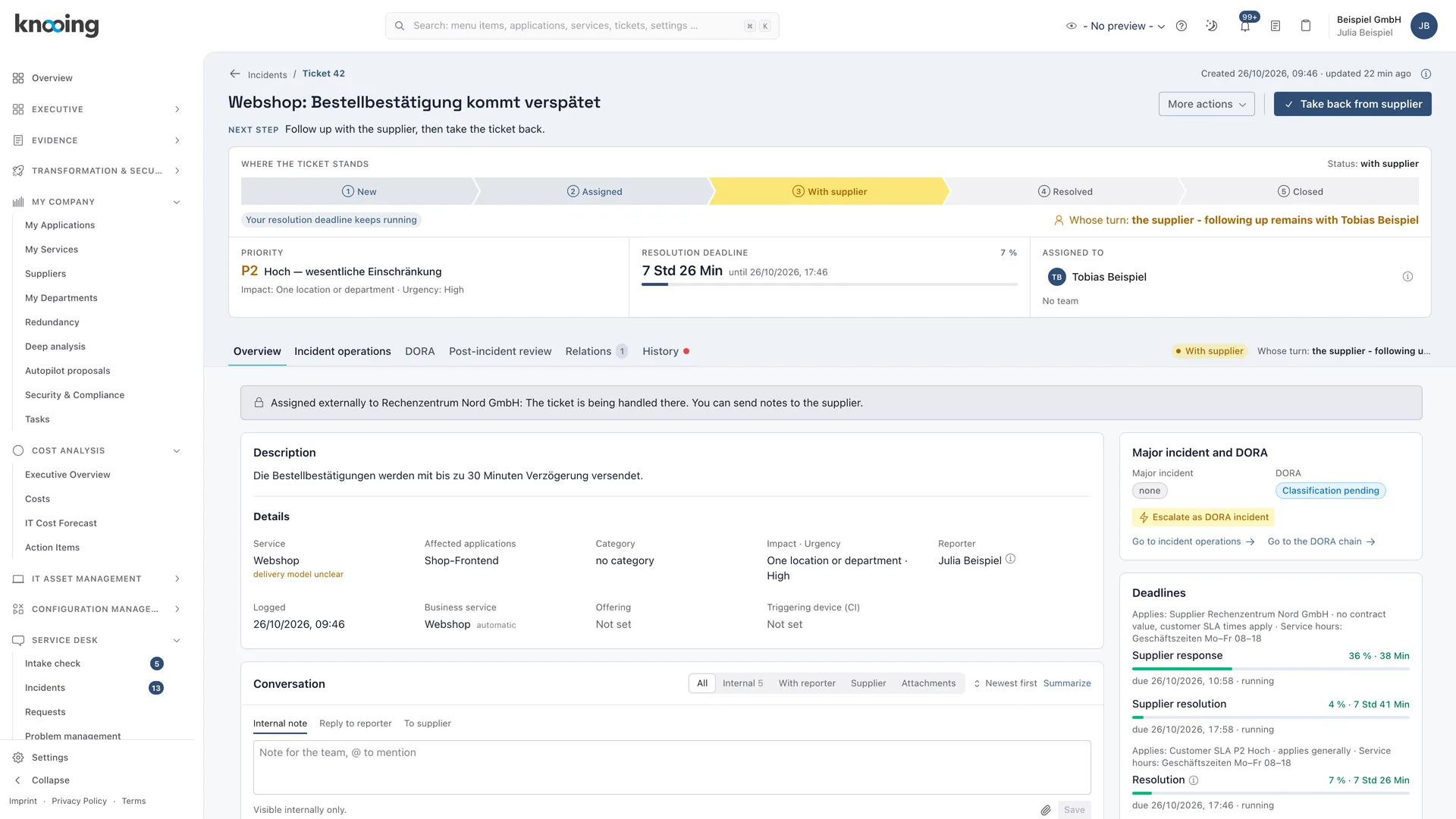
Many organisations run their IT with several service providers and their own tools. knooing OS assigns tickets to the right provider, syncs them with its system and measures its performance with your own clock.
Managing service providers
Multi-provider operations without gaps.
01Provider routing
Every ticket with the right provider.
Routing rules assign tickets to the right provider automatically. New rules take effect only after a second person approves them. On the ticket, you see which provider is currently responsible and which deadline applies.
- Request, approve and apply routing rules with a dry run, versions with a valid-from date
- Rerouting only by the service integrator, SIAM roles per service
- Bring in another provider without access to other parties' confidential data
- Filter tickets by current provider
02Instance bridge
Sync with the provider's tool.
The instance bridge syncs tickets in both directions with a provider's ITSM instance. You decide which instance writes which field and runs which step. Conflicts become cases for you to resolve instead of getting lost.
- Field ownership and process split, each with four-eyes approval
- Versioned field and value mapping with resolution cases
- Masking and filter rules for outgoing data
- Daily reconciliation, runtime limits with escalation and a conflict view
03ServiceNow
Handover to the provider's ServiceNow.
If a provider works with ServiceNow, you hand incidents over directly from knooing. Comments, attachments and status flow back, and you adopt the provider's solution on the ticket.
- Create and test a ServiceNow instance, assign suppliers
- Send comments from the conversation and attachments
- Resolve urgency mismatches, report closure
- Read the integration's communication log
04Measure performance
Check provider performance with your own measurement.
knooing measures SLAs itself and puts its measurement next to the provider's. You lock in deviations as a report. From the SLA rate, knooing derives the data basis for bonus and malus per supplier.
- Instance comparison: SLA deviations between the provider and your own measurement
- Data basis for bonus and malus per supplier, as a locked report
- Experience level KPIs per provider and service
- Standardised provider onboarding and offboarding, define the system of record per ticket type
Documentation
How it works in detail.
Documentation
Provider routing at a glance: which provider is responsible for a ticket
What provider routing rules do, how knooing determines the responsible provider, when it is engaged automatically and where you see responsibility, deadlines and handovers on a ticket.
5 min read
Guide
Request a routing rule: assign tickets to the right provider automatically
Step by step to a routing rule: open Provider routing, set name and rank, choose the conditions, set provider and basis and submit the request for four-eyes approval.
6 min read
Guide
Reassign a ticket to another provider: as service integrator
How a service integrator reassigns a ticket to another provider with a valid contract, records the reason and sees how long the reassignment lasts.
4 min read
Documentation
Instance bridge overview: synchronizing tickets with a service provider's instance
What the instance bridge is, which roles a connection can have, where to set up and monitor the bridge in knooing, what depends on the other side and which guide fits which task.
6 min read
Guide
Define field write authority: which instance writes which field
Define per connection, ticket type and field whether the leading instance, your instance or both may write, who may override a blocked change, and apply the definition once it is approved.
7 min read
Guide
Hand an incident over to your service provider's ServiceNow
You hand an incident from knooing over to the responsible provider's ServiceNow instance, check beforehand what is sent and then read the provider's number and status on your incident.
7 min read
Guide
Instance comparison: SLA deviations between provider and your own measurement
How to find, filter and export all deviations between the SLA clock of the provider instance and your own clock under Service desk > Instance comparison, and how to archive monthly reports.
5 min read
Guide
Derive bonus and malus per supplier from the SLA rate
You define bonus and malus bands per supplier and generate a fixed report that derives an amount from the restoration time compliance and the annual contract value.
5 min read
Make data-driven IT decisions in minutes, starting today.
Schedule a free, no-obligation demo